
Email Marketing, BLOG, Marketing & SEO
7 Powerful Mailchimp Features for Ecommerce: A Complete Guide

Nov
Running an online store involves more than listing products and processing orders. You also need to attract potential customers, stay connected with existing buyers, and encourage people to return. Managing all these activities can become time-consuming, especially when customer information and marketing campaigns are spread across different platforms.
This is where Mailchimp features for ecommerce can help. By bringing together email marketing, audience management, automation, and reporting tools, Mailchimp helps online businesses organize their marketing activities more efficiently. These Mailchimp features for ecommerce can also help store owners make better use of customers and purchase data to create more relevant campaigns, depending on their ecommerce platform, integration, and subscription plan.
But which features are actually useful for an online store? Let’s explore the main tools, how ecommerce automation works, and how these features can support better marketing decisions.
What Are the Main Mailchimp Features for Ecommerce?
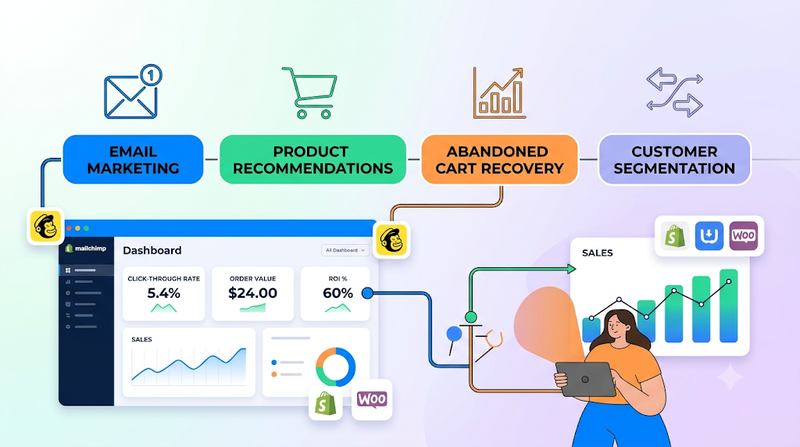
Mailchimp offers a range of tools designed to support different stages of the ecommerce customer journey, from attracting potential customers to building long-term relationships with existing buyers. Some features help store owners create and manage email campaigns, while others make it easier to organize customer information, segment audiences, and deliver more relevant product promotions. By bringing these tools together, businesses can create more consistent communication and provide customers with content that better matches their interests and shopping behavior. However, the exact features and capabilities available may vary depending on the connected ecommerce platform, integration settings, and Mailchimp subscription plan.
How Can Mailchimp Features for Ecommerce Performance?
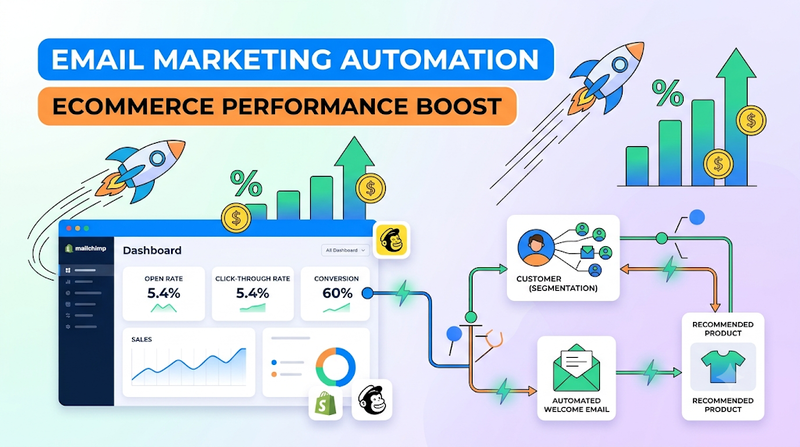
Creating campaigns and automating emails are useful starting points, but businesses also need to understand whether their marketing activities are working. Mailchimp provides reporting and optimization tools that can help store owners evaluate campaign results and make informed adjustments.
Ecommerce Analytics and Sales Tracking
Sending an email does not automatically mean a campaign is successful. Store owners need to look at how subscribers respond and whether marketing activity contributes to business goals.
Mailchimp reporting can provide information about campaign performance, such as opens, clicks, and other available engagement metrics. When ecommerce tracking is properly connected and supported, businesses may also be able to review sales-related information associated with their marketing campaigns.
These reports help answer practical questions:
- Are subscribers opening the emails?
- Which links or products receive more clicks?
- Are certain campaigns generating more engagement?
- Is connected ecommerce activity showing results after a campaign?
For example, an online store may notice that emails featuring product guides receive more clicks than emails containing only discount announcements. That information could encourage the business to create more educational content.
Remember that reporting accuracy depends on tracking setup, integration support, and the metrics available in your account. It is useful to review the configuration before making major decisions based on campaign data.
A/B Testing and Email Campaign Optimization
Sometimes, a small change can affect how people respond to an email. The subject line, call-to-action wording, layout, or send time may influence campaign engagement.
A/B testing allows marketers to compare different versions of selected email elements when the feature is available for their campaign type and plan. Rather than relying entirely on personal preference, businesses can use test results to understand which version performs better with their audience.
For example, a fashion store could compare two subject lines: one highlighting a seasonal collection and another focusing on a limited-time offer. The results may show which message attracts more opens among the selected audience.
Testing should focus on one or a small number of meaningful differences at a time. If too many elements change simultaneously, it becomes harder to understand what influenced the result.
Over time, these experiments can help businesses improve their email content, refine campaign layouts, and develop a clearer understanding of subscriber preferences.
Customer Insights and Marketing Performance
Campaign reports become more valuable when businesses look beyond individual email results. Customer insights are an important part of **Mailchimp features for ecommerce**, helping store owners understand which audiences are engaged, what types of content attract attention, and where marketing efforts may need improvement.
For example, a store may find that first-time buyers respond well to introductory offers, while repeat customers engage more with new product announcements. Instead of sending identical campaigns to both groups, the business can adjust its messaging to better suit each audience.
It is also useful to compare performance over time. A single campaign may not provide enough information to identify a reliable trend. Reviewing several campaigns can reveal whether engagement is improving, which segments are responding, and what content deserves more attention.
By using Mailchimp features for ecommerce to review customer insights and campaign results, businesses can make more practical marketing decisions. Rather than increasing the number of emails sent, a store might focus on improving audience targeting, adjusting its content, or refining its automation workflows.
How Do Mailchimp Ecommerce Automation Features Work?
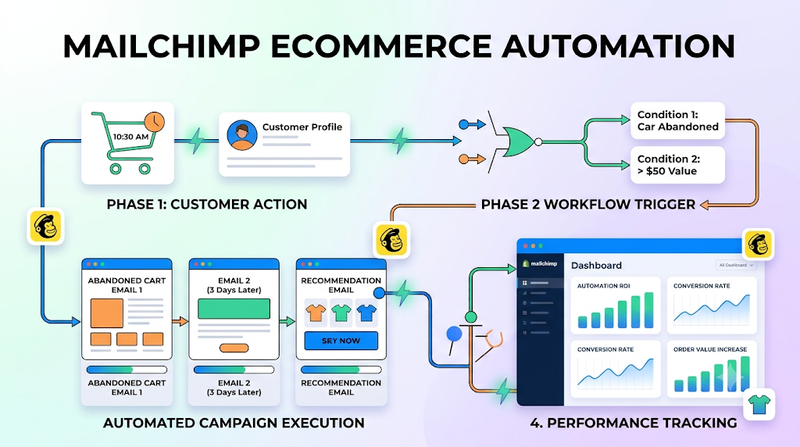
Email automation helps online stores communicate with customers at suitable moments without manually preparing and sending every message. Instead of treating every campaign as a separate task, businesses can create workflows that respond to specific actions or conditions.
Conclusion
The right marketing tools can make it easier for ecommerce businesses to stay connected with customers while managing their daily operations. Mailchimp features for ecommerce bring together campaign creation, audience segmentation, automation, and reporting tools that can support different stages of the customer journey.
For online stores, the value of Mailchimp features for ecommerce comes from using these tools with a clear purpose. Customer data can help create relevant segments, automation can reduce repetitive work, and campaign reports can show which messages are getting attention. Not every store needs to use every feature from the beginning. Starting with a few practical tools and improving them over time is often a more manageable approach.
Before building your marketing strategy, review your store integration, available plan features, and business goals. This will help you choose the Mailchimp tools that make sense for your ecommerce operations.
Frequently Asked Questions
1. What are the most important Mailchimp features for ecommerce?
Some useful features include email campaign creation, audience segmentation, ecommerce integrations, marketing automation, campaign reporting, and supported personalization tools. The best combination depends on the store’s size, marketing goals, integration, and Mailchimp plan.
2. Can Mailchimp automate emails for online stores?
Yes. mailchimp features for ecommerce supports email automation workflows for use cases such as welcoming new subscribers, sending follow-up messages, and reminding shoppers about abandoned carts. Available triggers and features depend on the connected ecommerce platform and subscription plan.
3. Does Mailchimp support ecommerce integrations?
Mailchimp supports integrations with selected ecommerce platforms. These connections can help synchronize certain customer, product, and order information, although the available data and functions vary by platform and integration.
4. Is Mailchimp useful for small ecommerce businesses?
Mailchimp can be useful for small online stores that want to organize email campaigns, manage audiences, and automate parts of their customer communication. Small businesses should compare the available features and plan limits with their actual needs before choosing a setup.
