
Email Marketing, BLOG, Marketing & SEO
How to Automate Ecommerce Email Marketing: 7 Easy, Proven Tips
Nov
Running an online store means handling many tasks every day. You need to manage orders, update products, answer customer questions, and promote your business. As your customer list grows, sending every marketing email manually becomes harder. It takes time and can cause you to miss important opportunities.
Learning how to automate ecommerce email marketing can make this work easier. Email automation sends messages when customers take specific actions, such as subscribing to your newsletter, abandoning a shopping cart, or completing a purchase. You create the workflow once, set its conditions, and let it handle routine communication.
Tools like Mailchimp help store owners organize customer data, manage audiences, and build automated email journeys. This guide explains how to automate ecommerce email marketing with practical workflows that can support your online store as it grows.
Why Should You Automate Ecommerce Email Marketing?
Ecommerce email automation helps online stores send relevant messages based on customer actions. It reduces repetitive work, supports personalized communication, and creates more opportunities to build customer relationships. Understanding how to automate ecommerce email marketing also helps you decide which tasks are worth automating first.
Save Time on Repetitive Email Marketing Tasks
Sending similar emails to individual customers takes time. The workload becomes harder as your subscriber list grows. New subscribers need welcome messages, shoppers may need abandoned cart reminders, and previous buyers may expect follow-up emails.
With email marketing automation, you can create a workflow for each situation. A new subscription can trigger a welcome email. An eligible abandoned cart event can start a reminder sequence when your ecommerce integration supports it.
Once configured, these workflows handle routine communication without requiring you to send each message yourself. You can spend more time managing inventory, improving products, and helping customers.
This is one of the main reasons store owners explore how to automate ecommerce email marketing. Automation does not replace your marketing strategy. It gives you more time to focus on the decisions that help your business grow.
Create More Personalized Customer Experiences
Customers are more likely to engage with emails that match their interests. Sending the same promotion to everyone may not be useful because subscribers have different needs and purchase histories.
Personalized email marketing uses customer information to make messages more relevant. You can use available customer profiles, purchase history, and engagement data to understand what different groups may need.
For example, new subscribers can receive a brand introduction. Returning customers may receive product recommendations based on previous purchases. Shoppers interested in a specific category can receive related product updates.
Audience segmentation makes this easier. You can group contacts by their behavior, interests, or purchase activity. This helps your ecommerce email marketing automation deliver messages that fit each customer’s relationship with your store. It is also an important part of learning how to automate ecommerce email marketing without sending the same message to every subscriber.
Turn Customer Interactions into Sales Opportunities
Customer actions can show when a follow-up message may be useful. Someone who leaves products in a shopping cart may need a reminder. A recent buyer may appreciate product guidance or recommendations.
Automated emails help your store respond to these moments:
- Abandoned cart reminders: Encourage shoppers to return to their carts and review unfinished purchases.
- Post-purchase emails: Thank customers and share order information or product guidance.
- Product recommendation emails: Suggest complementary products based on available purchase information.
- Win-back campaigns: Reconnect with inactive customers through relevant offers or product updates.
These messages do not guarantee more sales. However, they help your store maintain communication without relying on manual follow-ups. They also give customers useful information at relevant stages of the buying journey.
How to Automate Ecommerce Email Marketing with Mailchimp?
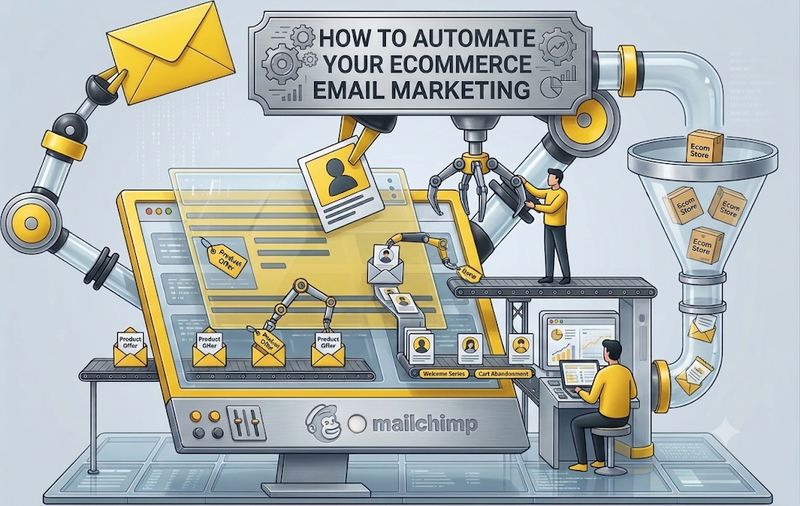
To understand how to automate ecommerce email marketing with Mailchimp, start by connecting your store, organizing your audience, and building workflows around customer actions. Available features depend on your ecommerce platform, integration, and Mailchimp plan.
Connect Your Ecommerce Store and Organize Your Audience
Your automation workflows need accurate customer information. First, connect your online store to Mailchimp through a supported integration. Depending on your setup, the connection may sync subscriber details, customer profiles, order records, and product data.
After connecting your store, review the information available in your account. Then organize your contacts so each workflow reaches the right audience.
Follow these steps:
- Connect your store: Follow the integration instructions for your ecommerce platform.
- Review synced data: Check which customer, order, and product details are available.
- Organize contacts: Use relevant tags, audience groups, and segments.
- Check subscriber consent: Make sure contacts have permission to receive marketing emails.
For example, you can create a segment for previous buyers or group subscribers by their interests. Accurate data helps prevent irrelevant messages and gives your automation strategy a reliable foundation. It is the first practical step in how to automate ecommerce email marketing with customer data you can use.
Build Essential Ecommerce Email Automation Workflows
You do not need dozens of workflows when starting out. Begin with a few automated email sequences that support important stages of the shopping experience.
Here are four useful ecommerce email automation workflows to consider:
- Welcome email series
Trigger: A visitor subscribes to your mailing list.
Send a friendly introduction to your brand. Highlight popular products and explain what subscribers can expect from future emails. Each message in the series should have a clear purpose.
- Abandoned cart emails
Trigger: A shopper adds products to a cart but does not complete the purchase, when the required tracking and integration are available.
Remind the shopper about the products they left behind. Include relevant product details and a direct link back to the cart when supported.
- Post-purchase emails
Trigger: A customer completes an order.
Thank the customer and provide useful after-sales information. Depending on your setup, follow-up messages can include product care advice, review requests, or related product suggestions.
- Win-back emails
Trigger: A customer meets your chosen inactivity or engagement conditions.
Reconnect with previous buyers through relevant product updates or suitable offers. Define inactivity carefully so active customers do not receive unnecessary reminders.
These workflows cover important moments before and after a purchase. When deciding how to automate ecommerce email marketing, choose the sequences that match your products and customers instead of activating every automation at once.
Set Triggers, Timing, and Personalized Email Content
An automation trigger is an event or condition that starts a workflow. Sending delays determine when each message arrives. Personalization fields help tailor the email to the recipient.
For example, a new subscription can trigger a welcome message. A completed order can start a post-purchase sequence. An abandoned cart workflow may begin when the integration records an eligible cart event.
When configuring each workflow:
- Choose the right trigger: Match the starting event to the email’s purpose.
- Set sending delays: Give customers enough time between messages.
- Personalize the content: Use available names, product details, or purchase information.
- Define exit conditions: Stop messages when customers no longer meet the workflow rules.
Before activating a sequence, preview each email and test its links. Check the email layout, call-to-action buttons, and mobile display. Also review the workflow conditions to prevent incorrect or duplicate messages.
These settings are essential when learning how to automate ecommerce email marketing because they determine who receives each email and when it arrives.
How to Improve Your Ecommerce Email Automation Performance?
Creating an automated workflow is only the beginning. You also need to measure results and make regular improvements. This helps your email marketing strategy stay relevant as customer behavior and business goals change. Good optimization is an important part of how to automate ecommerce email marketing successfully over time.
Track Email Automation Results with the Right Metrics
Email reports show how recipients interact with your automated messages. Review individual emails and complete workflows to understand where customers engage or lose interest.
Focus on these metrics:
- Click-through rate: Measures how often recipients click links in delivered emails.
- Conversion rate: Tracks how many recipients complete a desired action.
- Attributed revenue: Helps assess sales associated with email activity under your reporting model.
- Unsubscribe rate: Shows how many recipients leave your mailing list.
Open rates can provide extra context, but they are not a perfect measure of engagement. Email privacy features and automated activity can affect open tracking.
If an email receives clicks but few purchases, review the landing page, product offer, and checkout process. If recipients rarely click, test the subject line, email content, and call to action. Use Mailchimp reports alongside your store analytics to make better decisions.
Optimize Email Content and Customer Segmentation
Effective email optimization starts with understanding what each audience needs. A new subscriber may need information about your brand. A returning buyer may prefer personalized product suggestions based on previous purchases.
Use customer segments to deliver relevant messages. Then test individual email elements to see what encourages engagement.
You can experiment with:
- Subject lines that communicate a clear benefit.
- Calls to action that explain the next step.
- Product recommendations that match customer interests.
- Sending schedules that fit each workflow.
Change one important element at a time when possible. This makes it easier to understand which adjustments influence clicks and conversions. These improvements help you get more value from your ecommerce email marketing automation and make each message more relevant.
Avoid Common Ecommerce Email Automation Mistakes
Poorly configured workflows can create confusing customer experiences. For example, sending an abandoned cart reminder after a customer has completed the purchase may frustrate the recipient.
Other common problems include using outdated customer data, sending too many emails, and failing to test automation triggers. Overlapping workflows can also cause subscribers to receive several messages within a short period.
To avoid these issues:
- Review workflow conditions before activation.
- Exclude customers when they no longer meet the intended criteria.
- Check email frequency across overlapping sequences.
- Test links, images, and personalization fields.
- Review subscriber consent and applicable email marketing requirements.
Automation is not a one-time setup. Regular workflow reviews, performance checks, and content updates help your email strategy remain useful as your store grows.
Conclusion
Learning how to automate ecommerce email marketing can make customer communication easier to manage. Welcome emails, abandoned cart reminders, post-purchase follow-ups, and win-back campaigns help your online store stay connected with customers throughout the buying journey.
You do not need a complicated system to begin. Connect your store, organize your audience, and create a few workflows for your most important customer interactions. Then use email reports, engagement metrics, and customer feedback to improve your messages.
Mailchimp can support this process through its audience management and automation tools, depending on your integration and account plan. Start with simple workflows, test each message, and use what you learn to improve how to automate ecommerce email marketing for your store. Keep your customers’ needs at the center of every email.
FAQs
1. What Is Ecommerce Email Marketing Automation?
Ecommerce email marketing automation uses predefined triggers and workflows to send emails based on customer actions or conditions. Common examples include welcome messages, abandoned cart reminders, and post-purchase follow-ups.
2. Which Ecommerce Emails Should I Automate First?
Start with welcome emails, abandoned cart reminders, and post-purchase messages. These workflows support common customer interactions. You can add win-back campaigns when you have enough customer activity data to define an appropriate audience.
3. Can I Automate Ecommerce Email Marketing with Mailchimp?
Yes. Mailchimp provides audience management and email automation tools that can support ecommerce workflows. Available triggers, synced store data, and automation features depend on your ecommerce integration, account plan, and configuration.
4. How Often Should Automated Ecommerce Emails Be Sent?
The right frequency depends on the workflow and customer action. Send messages when they provide useful information, avoid overlapping sequences, and monitor engagement and unsubscribe rates. Adjust your schedule based on customer responses.
