
Bettamax, BLOG, E-commerce Platforms, Website & Hosting
Ecommerce Platform Features Explained: 8 Parts of BettaMax
Nov
A long feature list can make a new online seller feel lost. Many beginners open a platform’s website, see dozens of tools, and wonder which ones matter. This guide offers ecommerce platform features explained of BettaMax in plain words, one part at a time. It covers what the platform is, who it is for, and what each main tool does.
The guide uses eight short parts. Parts 1 and 2 give the background. Parts 3 to 5 cover the core tools, and Parts 6 to 8 cover growth, safety, and pricing. All feature descriptions come from BettaMax’s own pages, so read them as the company’s statements, not as a review. Taken together, the eight parts give ecommerce platform features explained of BettaMax in a form that is easy to scan.
What Is BettaMax, and Who Is It For?
BettaMax describes itself as an all-in-one platform for dropshipping stores. Parts 1 and 2 give the background for the ecommerce platform features explained of BettaMax in the rest of this guide.
Part 1: An All-in-One Platform for Dropshipping
An ecommerce platform is software that lets you build and run an online store. It is the hypernym. A dropshipping platform is one hyponym of it. In dropshipping, the seller does not keep stock. A supplier packs and ships each order.
According to BettaMax’s own pages, the platform joins several jobs in one dashboard: building the store, managing products, handling orders, taking payments, and viewing reports. In word terms, the platform is the holonym, and these jobs are its meronyms. The idea is simple. One place replaces many separate tools. That single dashboard is the starting point for ecommerce platform features explained of BettaMax.
Part 2: Who Benefits Most
BettaMax says its main audience is sellers who want to start without technical skills. Its pages also say experienced sellers with growing stores can use it. Beginner and experienced are antonyms, and the platform aims at both ends.
The pages describe a target market too: sellers from Vietnam who sell to customers in the United States, the United Kingdom, and Canada. The setup suits people who want one dashboard, not a stack of tools. It may suit others less, so check that its markets, payment options, and terms match your own plan. Knowing the audience makes ecommerce platform features explained of BettaMax more useful.
Which Core Features Does the Platform Offer?
Three core jobs come first: building the store, handling orders, and taking payments. Parts 3 to 5 explain each one, and they form the heart of the ecommerce platform features explained of BettaMax in this guide.
Part 3: Storefront Builder and Product Management
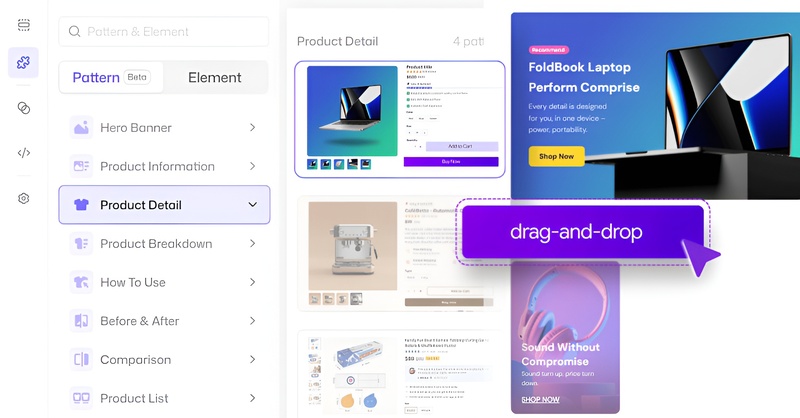
The storefront builder, also called the store builder or website builder, is the tool that shapes what shoppers see. These names are synonyms in most guides. BettaMax says its builder works by drag and drop, with no coding, and that it offers brand customization tools. Its help article adds that ready-made templates exist for different niches.
Product management comes next. You can add products manually or import them in bulk. The pages also describe a “Product Request” tool. You upload the items you want, and the BettaMax team returns pricing for review. A dashboard then helps you list and improve the catalog. Manual and bulk are antonyms here, and the choice depends on how many products you plan to sell. These two tools open the list of ecommerce platform features explained of BettaMax.
Part 4: Orders, Suppliers, and Fulfillment
Orders are where a dropshipping store succeeds or fails. According to BettaMax, the dashboard tracks each order from placement to delivery. Orders sync automatically to the dashboard, and you add the supplier’s tracking number. Automatic and manual are antonyms, and fewer manual steps save time.
The pages also describe a fulfillment service. BettaMax says it coordinates with suppliers on packing and shipping, and that tracking updates appear in the system. A “Live View” tool shows current orders in real time. The pages give no shipping rates or delivery times in the parts read for this guide, so ask for those before you commit. Orders are the busiest area among the ecommerce platform features explained of BettaMax.
Part 5: Payments and Withdrawals
Payments decide whether shoppers can actually buy. The BettaMax Payments page lists more than 125 payment methods, including cards, digital wallets, bank debits, and buy-now-pay-later options. It also states that availability depends on the seller’s eligibility and on the customer’s country and currency. Another page names PayPal and other integrated gateways.
Withdrawals are the other half. One page says sellers can move money to a Vietnamese bank account through a partner. The same page describes a “Pay T+0” model, where funds move on the same day as the transaction. The Payments page does not state a payout schedule or fee amounts, so confirm the timing and the fees in your own account before you rely on them. Payments are the most detailed of the ecommerce platform features explained of BettaMax.
Which Tools Help Grow and Protect a Store?
Once the store runs, growth tools, reports, and safety features matter. Parts 6 to 8 cover them, along with the pricing model, to finish the ecommerce platform features explained of BettaMax.
Part 6: Marketing, Sales Channels, and Upsell Tools
Marketing is the hypernym, and advertising tracking and email automation are two of its hyponyms. BettaMax says it connects with Facebook Pixel, TikTok Pixel, and Google Analytics, and that it offers email automation. A help article also names Google Ads conversion tracking, the Meta Conversion API, and the TikTok Events API.
The Solutions page lists two more tools. “Sell Multi Channel” connects the store to channels such as Facebook and TikTok. An “Up-Sell Tool” offers extra products to shoppers. Both aim at the same goal: more sales from the same visitors. These tools extend the ecommerce platform features explained of BettaMax beyond the basics.
Part 7: Analytics, Fraud Detection, and Team Roles
Reports show what is working. BettaMax says its analytics cover order volume, revenue trends, and fulfillment performance. A live view shows current activity as it happens.
Safety is the next layer. The Solutions page mentions real-time fraud detection that uses AI. The Payments page says sellers can monitor payment activity and review risk signals, and it lists card checks and encrypted data transmission. These tools can help spot payments that need a second look. They do not remove all risk, so keep reviewing your own orders.
For teams, the pages describe three roles: Admin, Staff, and Editor. These are hyponyms of the hypernym “user role”, and each role holds a different level of access. Another page lists a mobile app for managing the business from a phone. Safety and reports complete the ecommerce platform features explained of BettaMax.
Part 8: Pricing Model and What to Check Before You Start
BettaMax describes a usage-based model, with no fixed monthly subscription packages. It says basic features are free, and that percentage fees apply to payment gateways and premium services. Free and paid are antonyms, and this model mixes both. Wording differs across pages. One article mentions a free starting plan, and the site footer links to platform plans, so read the current pricing page.
Before you start, check five things:
- Whether your target markets and currencies are supported.
- The fee for each payment method you plan to use.
- The payout timing and the withdrawal steps.
- The shipping rates and delivery times for your products.
- The terms for refunds, disputes, and support.
These checks apply to any platform, and they turn a long feature list into a clear decision. Use them whenever you read ecommerce platform features explained of BettaMax or any other platform guide.
Conclusion
A long feature list becomes simple once it is split into parts. BettaMax describes an all-in-one dropshipping platform with a storefront builder, product tools, order tracking, payments, marketing links, reports, safety checks, and a usage-based price model. Many new sellers feel lost at the start, and a clear map removes much of that stress. Use these ecommerce platform features explained of BettaMax as a starting map, then confirm each detail on the official pages. Check the markets, the fees, the payout timing, and the terms before you commit. A calm check today saves a costly surprise later.
FAQ
What is BettaMax used for?
According to its own pages, BettaMax is used to build and run dropshipping stores from one dashboard. It combines a store builder, product management, order handling, payments, and reports. In a dropshipping store, a supplier packs and ships each order, so the seller does not keep stock. That model shapes all the ecommerce platform features explained of BettaMax.
How does BettaMax pricing work?
One BettaMax page describes a usage-based model with no fixed monthly subscription packages. It says basic features are free and that percentage fees apply to payment gateways and premium services. Other pages mention a free starting plan and platform plans, so read the current pricing page before you decide. Pricing details belong in any list of ecommerce platform features explained of BettaMax.
Do you need coding skills to build a BettaMax store?
No. BettaMax says its storefront builder uses drag and drop and needs no coding, and a help article mentions ready-made templates. You still need to choose products, set prices, and check suppliers and fees. Those decisions are business skills, not coding skills. Ease of use is one of the most asked questions about ecommerce platform features explained of BettaMax.
