Facebook Advertising, BLOG, Marketing & SEO
Best Facebook Ads Management Software in Mailchimp: 5 Buying Checks
Nov
You’ve been hovering over the upgrade button for days. You want better Facebook ads, but you don’t want to pay for features you’ll never use. That feeling is common, and money matters. If you’re comparing the best Facebook ads management software in Mailchimp for small business, this guide will help you decide with a clear head.
Here’s the honest short version. Mailchimp stores your contacts, and Meta runs your ads. The integration links the two, and your plan decides how much of it you can use. Below, you’ll find five buying checks, a plan comparison, and a simple rule for when to stay put.
Is Mailchimp the Best Facebook Ads Management Software for You?
Mailchimp doesn’t replace Meta’s ad tools. It works beside them. So the best Facebook ads management software in Mailchimp is less a single tool and more a set of features. The real question is whether those features fit your business.
What You Get From Mailchimp for Facebook Ads
The main feature is the Meta Business Extension. It connects Meta and Mailchimp, so you can manage data between them. You can target custom audiences with an automation flow. You can also match your Mailchimp audience with custom ad audiences.
Here’s what else you get:
- Meta Custom Audience action: adds contacts to a Custom Audience or removes them inside an automation flow.
- Automatic advanced matching: matches your customer details with people on Facebook.
- Create Ad option: lets you click Create Ad to build a new Meta ad after you connect.
- Pre-built segments: ready-made groups, such as First-time Customers, Repeat Customers, and Lapsed Customers.
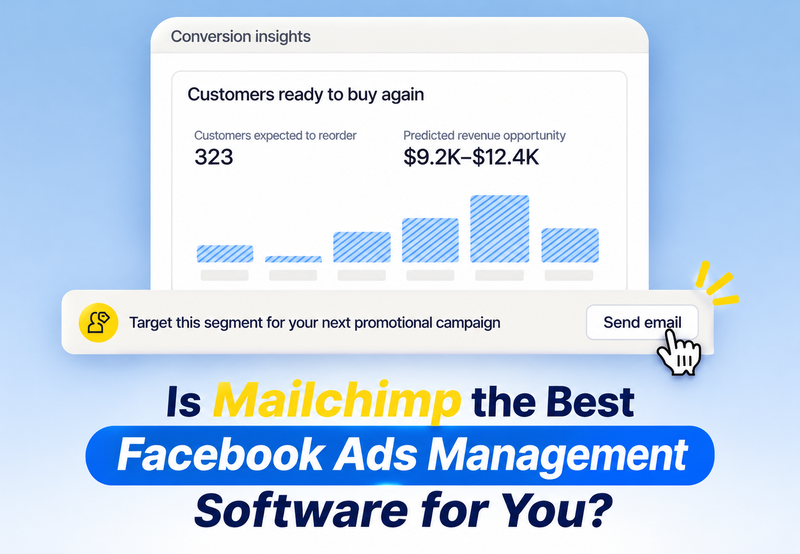
- Conversion Insights: shows revenue from Mailchimp next to total store revenue.
Mailchimp’s Facebook integration also handles organic posts. The paid ads run through Meta.
What You Still Do in Meta
Meta still runs your ads. You need an active Business Manager account and an ad account. During setup, you also connect your Facebook Page, Instagram Profile, and Meta Pixel.
Mailchimp’s conversion dashboard counts revenue tied to Mailchimp messages across email and SMS. It doesn’t show your Meta ad results. Plan to check those in Meta.
Who It Fits Best and Who Should Look Elsewhere?
It fits best in these cases:
- You already have an email list, and your contacts gave consent.
- You run an online store with order history. Customer behavior segments need e-commerce data.
- You want email and ads to work from one customer list.
Look elsewhere in these cases:
- You have no email list yet, so there is nothing to sync.
- You need a full ad suite for heavy creative testing and fast optimization.
- Your list is very small, so your ads have little to work with.
What Does It Cost, and Which Plan Is Worth It?
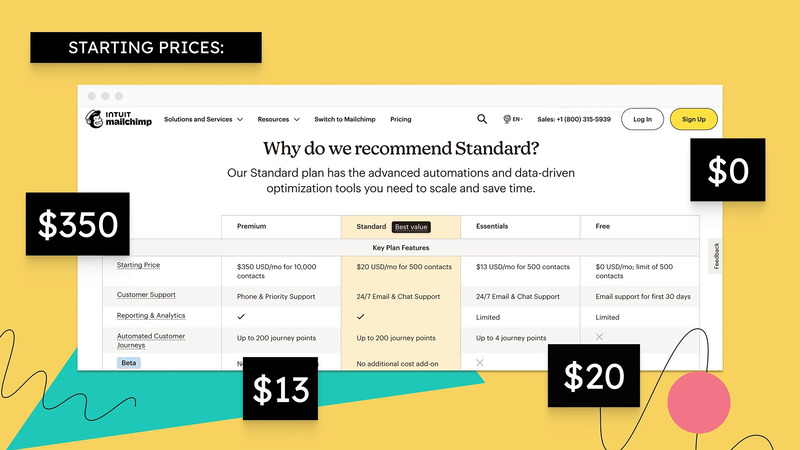
Prices change often, so this guide doesn’t list numbers. Check Mailchimp’s pricing page for current prices. Here’s how each plan affects the best Facebook ads management software in Mailchimp.
Essentials vs Standard for Facebook Ads
Mailchimp has four Marketing plans: Free, Essentials, Standard, and Premium. All Marketing plans can install the Meta Business Extension, but some features depend on your plan. Because Free is also a Marketing plan, you can test the connection before you pay.
Essentials suits you if you mainly want to connect and send emails. It includes automation flows with up to four steps, A/B testing, and scheduled emails.
Standard suits you if audiences and data drive your ads. It adds expanded automation flow features, advanced segmentation, pre-built segments, and multivariate testing. It also unlocks the Meta Custom Audience action, scheduled social posts, and the Conversion Insights dashboard. Conversion Insights also needs a connected store.
Here’s a simple rule. Start with the plan you have. Upgrade to Standard only when you need those features. That’s how you get the best Facebook ads management software in Mailchimp without overpaying.
The Real Costs Beyond the Plan (Ad Spend, Store Connection)
The plan is only one cost. Count every cost before you decide the best Facebook ads management software in Mailchimp is worth it:
- Ad spend: you pay Meta for paid ads. Mailchimp doesn’t include your ad budget.
- Contact count: your maximum contact count affects your plan price. If your audience grows more than expected, you’ll see an additional charge until you update it.
- Store connection: customer behavior segments and Conversion Insights need e-commerce data from a connected store. This is a setup cost, not a plan price. Your store platform may have its own fees, so check them.
- Your time: learning Meta’s tools takes hours.
There’s some good news. You can change or pause your plan at any time on the billing page. And if you send emails rarely, the Pay As You Go option has the same features as Essentials.
How Does Mailchimp Compare With Other Options?
Now let’s compare Mailchimp with the other routes. The best Facebook ads management software in Mailchimp is only “best” when it matches your goal.
Mailchimp vs Using Meta’s Ad Tools Alone
Meta’s own tools run and report your ads. Ads Manager is one of Meta’s ad tools. It gives you complete campaign control at no additional software cost. If you have no email list, Meta alone may be enough.
Mailchimp adds your customer list, segments, and automation in one place. It helps you keep ad audiences fresh. For example, an automation flow can add new buyers to one audience and remove them from another. The best Facebook ads management software in Mailchimp shines when you already email customers. Skip it when you don’t.
Mailchimp vs Dedicated Ad Software
This guide doesn’t name specific products, because features change fast. Use criteria instead. Dedicated ad software is usually built around the ads themselves. It often focuses on creating, testing, and improving them. Mailchimp is built around your contacts and email.
Compare them on these points:
- Creative and testing: how easily can you make and test ad variations?
- Automation: can rules adjust your ads for you?
- Reporting: does it show ad results, or only email and store results?
- Audience data: does it use your email list and store data?
- Pricing model: is it a flat fee, a contact-based fee, or a share of ad spend?
Mailchimp scores well on audience data. Dedicated ad software usually scores better on ad creation and improvement. Mailchimp’s own reports cover your Mailchimp messages.
Essential Buying Checklist Before Making a Purchase
Here are the five buying checks for the best Facebook ads management software in Mailchimp. Run them in order:
- Data readiness. Do you have a clean email list with proper marketing consent? Is your store’s order history available?
- Plan requirements. Which features do you need, such as the Custom Audience action, pre-built segments, or Conversion Insights? Check whether they require the Standard plan or higher.
- Total costs. Have you considered your Mailchimp plan, ad spend, store fees, and the time needed to manage campaigns? Check the latest plan prices on Mailchimp’s pricing page.
- Technical skills. Are you comfortable using Meta’s tools to manage ad settings, budgets, and campaign performance?
- Performance tracking. Do you know where to check your results? Use Meta for Facebook ad performance and Mailchimp for email and e-commerce reports.
If you answer yes to most of these, go ahead. If not, stay put or start with a lower plan. You can always change it later.
Conclusion
You’ve now covered the five buying checks: data, plan, cost, skills, and results. So, is Mailchimp the right choice? If your store already uses email marketing and you want to connect customer data with Facebook ads, Mailchimp is worth considering. It can be a good option when comparing the best Facebook ads management software for a small business. However, if you need full control over ad budgets, campaigns, and performance, Meta Ads Manager is still essential.
Start with the Mailchimp plan that fits your current budget. Connect Meta, test one pre-built segment, and run one ad. If the results justify the cost and you need more features, consider upgrading. Otherwise, stick with your current plan. Spend only when your business is ready. You’ve got this!
Frequently Asked Questions
1. Is Mailchimp worth it for Facebook ads?
It can be, if you already have an email list or an online store. Mailchimp stores your contacts and builds audiences. Meta runs and reports your ads. If you have no list yet, Meta’s own tools may be enough for now.
2. Which Mailchimp plan is best for Facebook ads?
Start with the plan you have. Every Marketing plan can install the Meta Business Extension. Standard unlocks the Meta Custom Audience action, pre-built segments, and Conversion Insights. Check Mailchimp’s pricing page for current plans.
3. Is Mailchimp better than managing ads in Meta alone?
They do different jobs. Meta runs and reports your ads. Mailchimp handles your contacts, segments, and audience syncing. Together they work well for shops with an email list. Alone, Meta may be enough if you have none.
4. What does it cost to run Facebook ads through Mailchimp?
You pay for your Mailchimp plan, which depends on your contact count. You also pay Meta for your ad spend, and your store platform may have fees. Check the pricing page to estimate the plan price
